





The latest Planet Mainframe CICS Virtual User Group, sponsored by Broadcom Mainframe Software and DataKinetics, delivered exactly what the title promised — a double feature that moved from intelligent region analysis all the way through to full vSAM data recovery. Hosted by Amanda Hendley, the session brought together three presenters from HCL Software: Rakesh Kumar Singh, Senior Manager for CICS Tools, along with developers Aman Sahni and Srikhar Avugaddi, each deep experts in their respective products.
Mastering System Synergy: CICS Interdependency Analyzer in Action
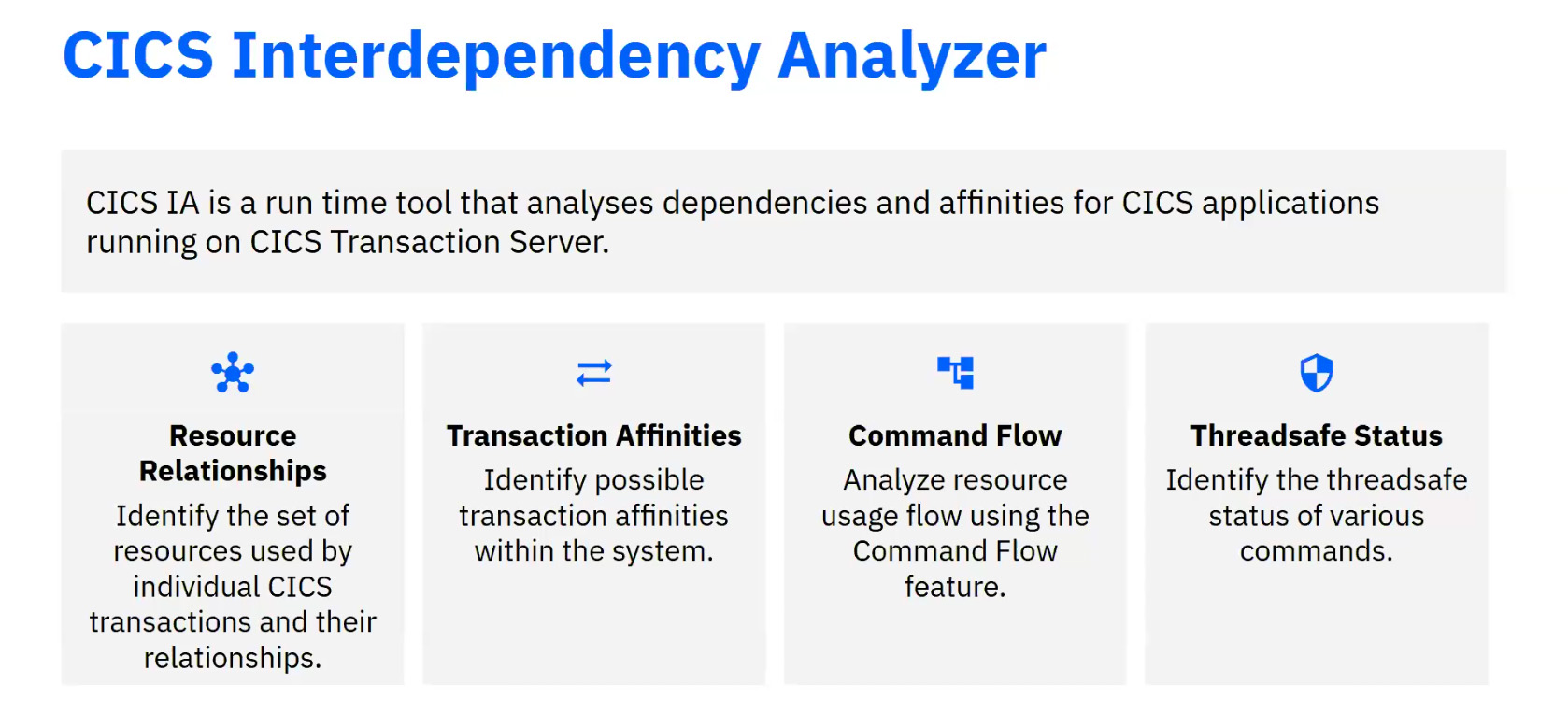
Rakesh opened by framing what CICS IA is really for. At its core, CICS Interdependency Analyzer is a runtime tool that maps the relationships between transactions, resources, and the systems they touch — Db2, MQ, IMS — giving teams the visibility they need to make confident decisions about routing, performance, and workload management. It monitors CICS API and SPI commands by default but can be extended to non-CICS resources as well, which makes it relevant well beyond simple CICS-only environments. The four pillars of the tool are:
- Resource mapping — identifying which resources each transaction uses and how they relate to one another
- Affinity detection — surfacing transaction affinities that could constrain dynamic routing decisions
- Command flow analysis — tracing how resources move through one or more transactions in chronological order
- Thread-safe evaluation — assessing whether specific commands are thread-safe, to support TCB optimization
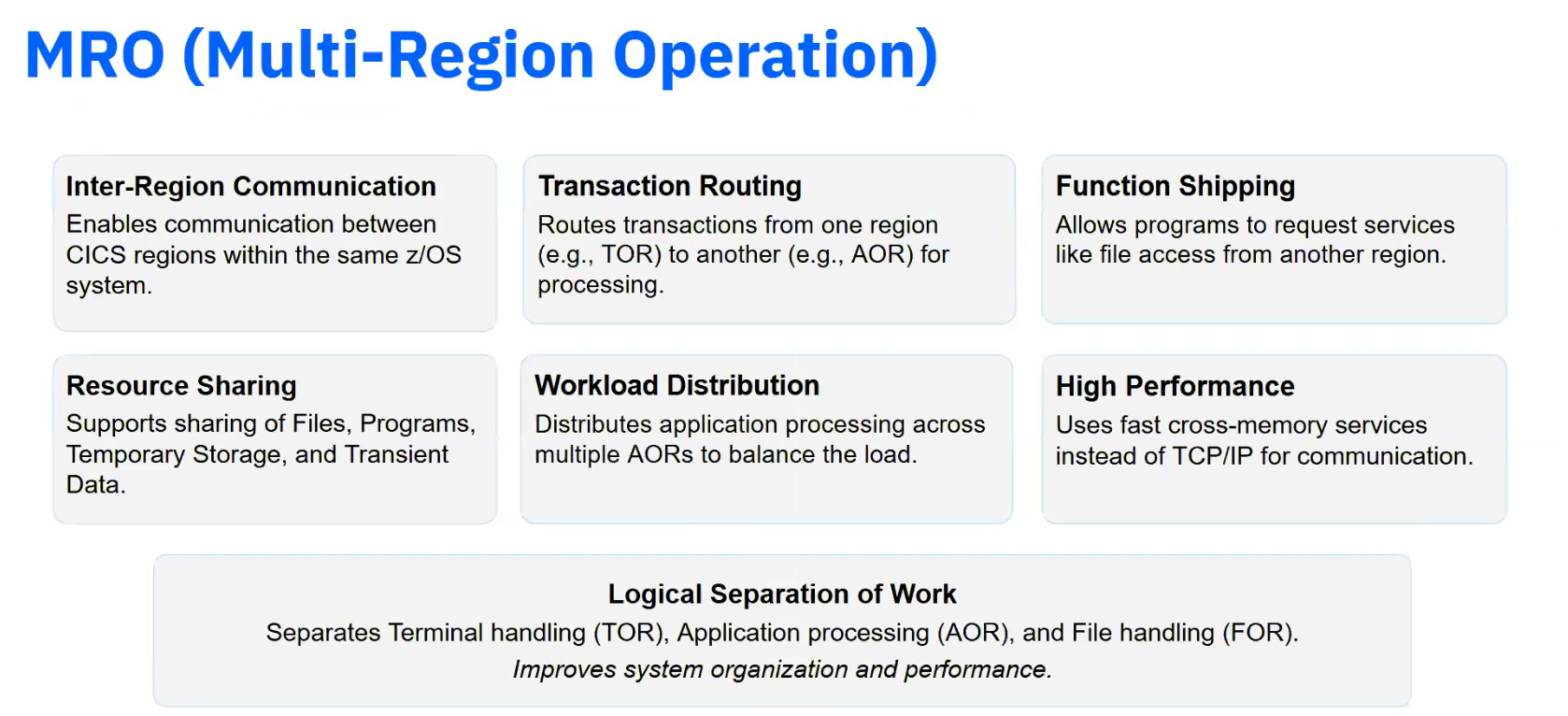
The session’s technical centerpiece was Multi-Region Operations, or MRO. For those unfamiliar, MRO allows multiple CICS regions within a Sysplex to communicate via cross-memory services — enabling transaction routing, function shipping, and workload distribution across regions while maintaining logical separation. It’s a common pattern in larger shops, and one where understanding transaction affinities becomes critical: if a transaction must stay in a specific region, you need to know that before you make routing decisions.
Aman took over the screen to demonstrate this with two live MRO-connected CICS regions. He started with the Interdependency and Affinity Collector, invoked via the CINT transaction, which immediately showed both regions visible from the primary region’s management panel — a clean illustration of how MRO connectivity surfaces through the tooling. Before starting collection, he walked through the configuration options: which API and SPI commands to capture, scheduling for automatic runs, and include/exclude lists for specific programs or transactions. It’s a level of granularity that matters in production environments where you don’t want to capture everything indiscriminately.
Once collection ran across both regions, the data was uploaded to Db2 via the CIUUPDB batch job and loaded into the CICS IA plugin interface in CICS Explorer. The Thread-Safe Report that followed showed total call counts, thread-safe versus non-thread-safe commands, and MQ and Db2 interactions — all broken down by region. For shops looking to optimize TCB usage and reduce unnecessary QR-mode execution, this kind of report cuts straight to what matters.
Don't miss these other great articles
The second collector Aman demonstrated was the Command Flow Collector, accessed via CINC. Where the Interdependency Collector focuses on what resources a transaction uses, Command Flow is about sequence — capturing every CICS, Db2, MQ, and IMS command in chronological order, along with the TCB mode at each step and the mode that preceded it. That TCB switch visibility is particularly useful when diagnosing performance issues caused by unexpected mode transitions. The data flows from log stream journals through two batch jobs (CIUJLCPY and CIUPDB5) into Db2, and from there into the plugin interface, where it can be viewed as a tabular report or as a graphical TCB switch diagram — portrait or landscape, depending on preference.
Never Lose Your Data Again: CICS VSAM Recovery
Srikhar opened the second half with a clear statement of the problem. VSAM datasets in most mainframe environments are updated from two directions: online by CICS transactions, and offline by batch jobs. Backing up daily gets you most of the way there, but if a dataset is corrupted at noon and your last backup was at 9am, those three hours of updates are gone unless you have a logging strategy in place. CICS VR exists to close that gap.
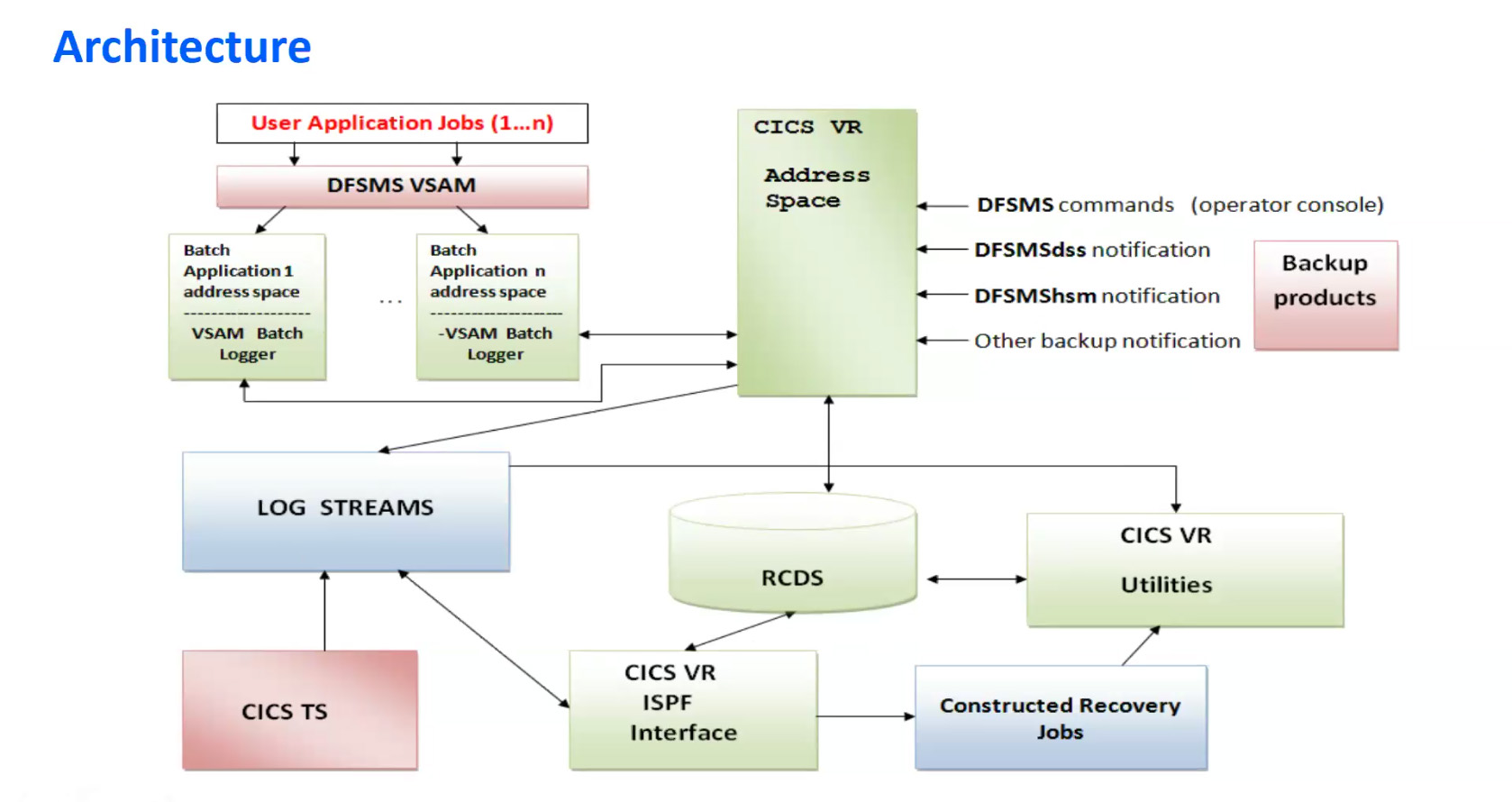
The architecture Srikhar described divides neatly along those two update paths. For batch updates, CICS VR introduces a VSAM Batch Logger — a component running in the client’s address space that intercepts VSAM open, get-update, put-update, and close operations via DFSMS, and routes log records through the CICS VR address space into MVS system logger log streams. For CICS TS updates, CICS itself handles the logging; CICS VR’s role is to perform a log-of-logs scan and write the resulting metadata into Recovery Control Datasets (RCDS). The RCDS is the connective tissue of the whole system — it holds dataset names, log stream associations, FCT details, and open/close timestamps, and it’s what the recovery utilities read from when it’s time to act.
Before any recovery is possible, datasets need to be defined with the appropriate logging option:
- FOR LOG REDO — captures after-images, used for forward recovery
- FOR LOG UNDO — captures before-images, used for batch backout
- FOR LOG ALL / FOR LOG REPLICATE — captures both, the right choice for datasets that may need either operation
That last option is worth flagging for any dataset updated by both CICS and batch, which is more common than it might sound.
Four Features, Live on Screen
Srikhar demonstrated all four key capabilities with running jobs and real VSAM datasets, which made the mechanics unusually concrete.
- Batch Logging was the foundation. After defining a KSDS cluster with FOR LOG REDO and tagging it to an MVS log stream, a test program loaded 10 records. The SYSLOG confirmed it: BATCH LOGGING REQUESTED, FOR LOG REDO, and BATCH LOGGING COMPLETED. Records were flowing into the log stream exactly as expected.
- Forward Recovery for Batch followed the classic scenario: 10 records loaded, backup taken, 5 more records added, then the dataset manually corrupted to simulate a real failure. Using the CICS VR ISPF interactive panel (DWWC-LIST), Srikhar selected the dataset, triggered a log-of-logs scan, and submitted the recovery job — which restored all 15 records to a new VSAM sphere. One feature worth highlighting: the panel allows you to specify a point-in-time recovery target, so if you know you only want to recover changes up to a specific hour, you can set that explicitly rather than always recovering to the most recent logged state.
- Forward Recovery for CICS TS followed an almost identical path, which was the point. The setup is slightly different — you link the VSAM cluster’s log stream to a CICS journal model using a journal number (in the demo, 61, corresponding to log stream DFHJ61), and set the file’s recovery parameter to RECOVERY ALL. After that, CICS handles logging automatically, and the CICS VR recovery panel does the rest. Srikhar ran a second set of updates (an EFGH transaction that updated three records and deleted one), corrupted the dataset, and recovered — arriving back at the post-update state with everything intact.
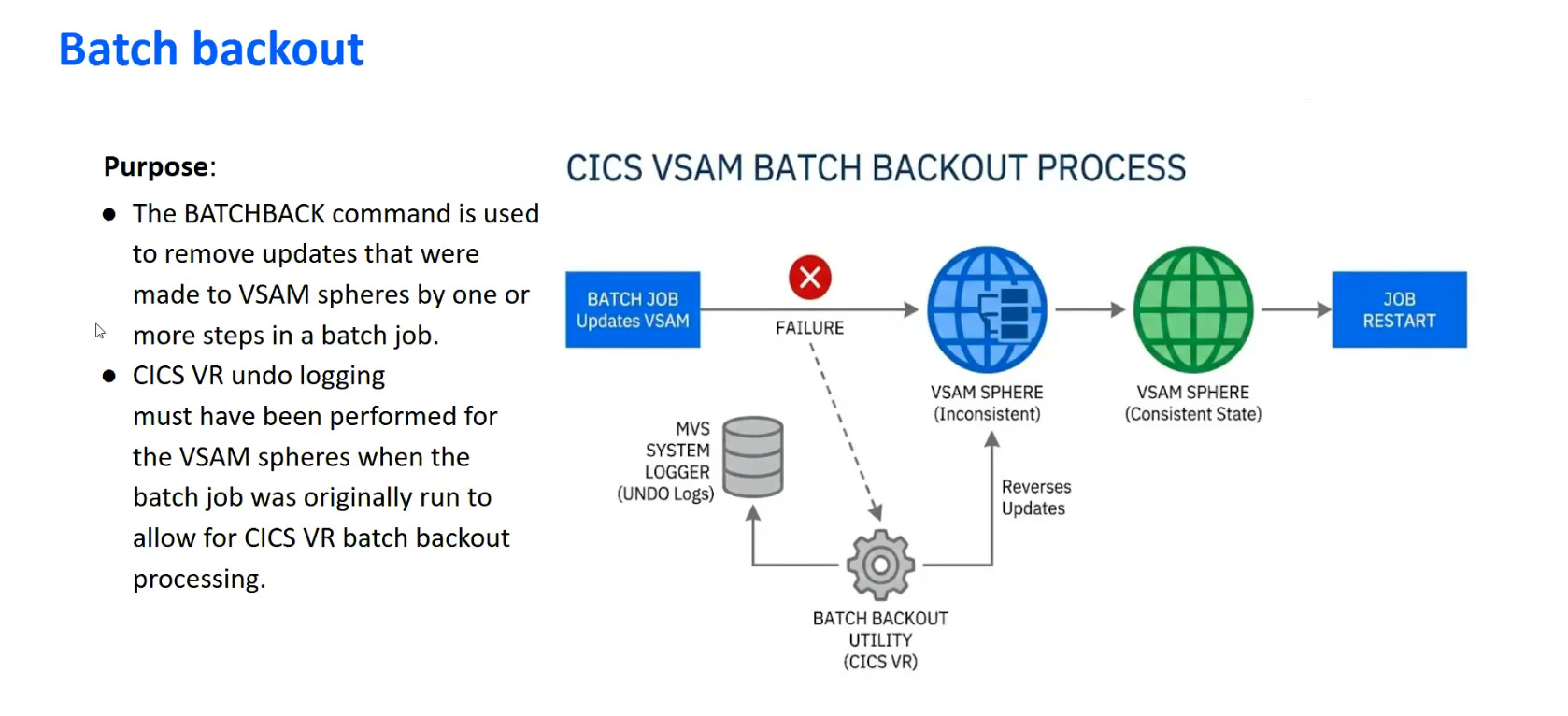
- Batch Backout addressed the scenario CICS handles naturally but batch does not: rolling back a specific job’s changes after the fact. With FOR LOG UNDO enabled on the cluster, before-images are captured as updates land. When something goes wrong — a job loads records it shouldn’t, or processes data incorrectly — you provide the job name and job ID to the batch backout utility, and those specific changes are rolled back. Srikhar demonstrated this by loading an intentional duplicate into a KSDS (which was rejected by VSAM, but the surrounding records landed), then backing out that entire job’s work. The last four records updated were rolled back cleanly.
One attendee asked whether a dataset updated by both CICS and batch could support both forward recovery and batch backout simultaneously. Srikhar confirmed it: define the cluster with FOR LOG ALL, and both after-images and before-images are captured. Whichever failure mode you encounter — corruption requiring forward recovery, or a bad batch job requiring backout — the logging is already in place to handle it.
For deeper reading, the team pointed to the IBM documentation for CICS VR version 6.3, and to a recently published Planet Mainframe article — Sharing VSAM Between CICS and Batch: How Routing Models Work — which pairs well with what was covered in this session.
This article was produced from session transcripts with the assistance of AI writing tools and reviewed by the Planet Mainframe editorial team.


0 Comments