





(aka “Linuxification” of Db2 Tools)
Broadcom Database Management Solutions for Db2 (Db2 Tools) are traditionally used from the z/OS ISPF interface or from batch. While this interface is familiar and efficient for some, for others, especially new audiences coming from the distributed platforms, this might slow down their onboarding.
Are you exploring new ways of running the Db2 Tools or to automate their usage? Would you like to use them directly from a Unix shell and simplify how they are used?
Please reach out if you find this information useful and would like to learn more or help shape future development.
This article shows a few examples of invoking the Db2 Tools from a Unix shell, such as generating a DDL for a particular object from the command line (similar to distributed platforms) or producing a textual explanation of a SQL statement that can be AI enhanced.
We assume a basic knowledge of Broadcom Db2 Tools such as RC/Query, Batch Processor, and Plan Analyzer.
Introduction
The Db2 Tools are traditionally used from the z/OS ISPF interface or in batch mode. However, if you have IBM z Open Automation Utilities (ZOAU) installed, you can execute your favorite tool from a Unix shell instead of submitting a batch job or navigating through panels.
ZOAU is an optional component of z/OS that provides utilities for working with z/OS using Unix command-line tools. These utilities are especially useful for automation (for example, with Ansible), but can also simplify regular use, particularly for next-gen mainframers familiar with the Linux environment. The Unix interface can make getting started with z/OS much easier and faster.
We will use the mvscmdauth utility of ZOAU to run the Db2 Tools (Db2 Tools main driver is an APF authorized program). Review the required authorizations in Installing and configuring ZOAU before you run the mvscmdauth utility.
Example 1: Running RC/Query Hierarchical DDL
You may want to generate a DDL for particular Db2 objects. For example, for a table space and its related objects (known as a hierarchical DDL). If you use RC/Query, you can generate a hierarchical DDL report (HDDL) in ISPF or in batch. By capturing the generated JCL and input from the generated batch job, you can create a Unix script to run the job from the Unix shell.
Let’s see how to navigate through ISPF to generate the HDDL JCL.

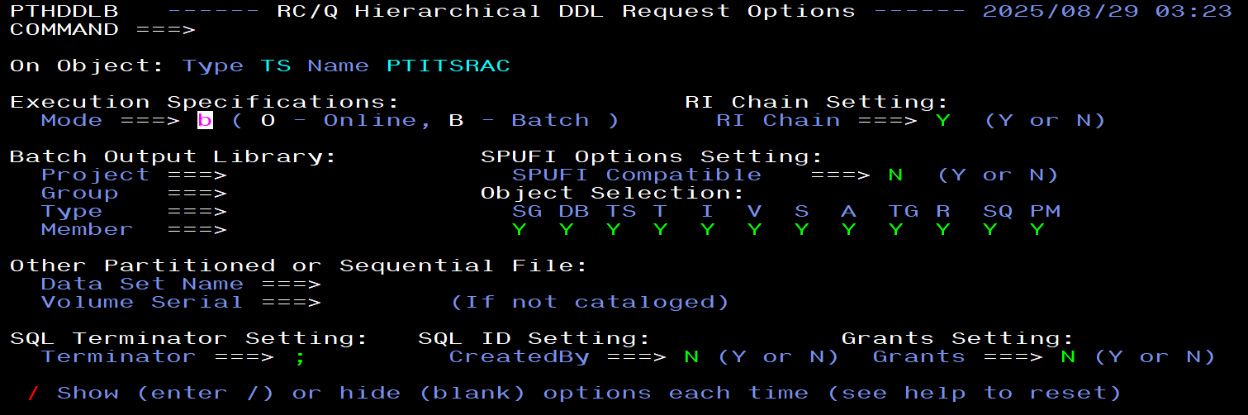
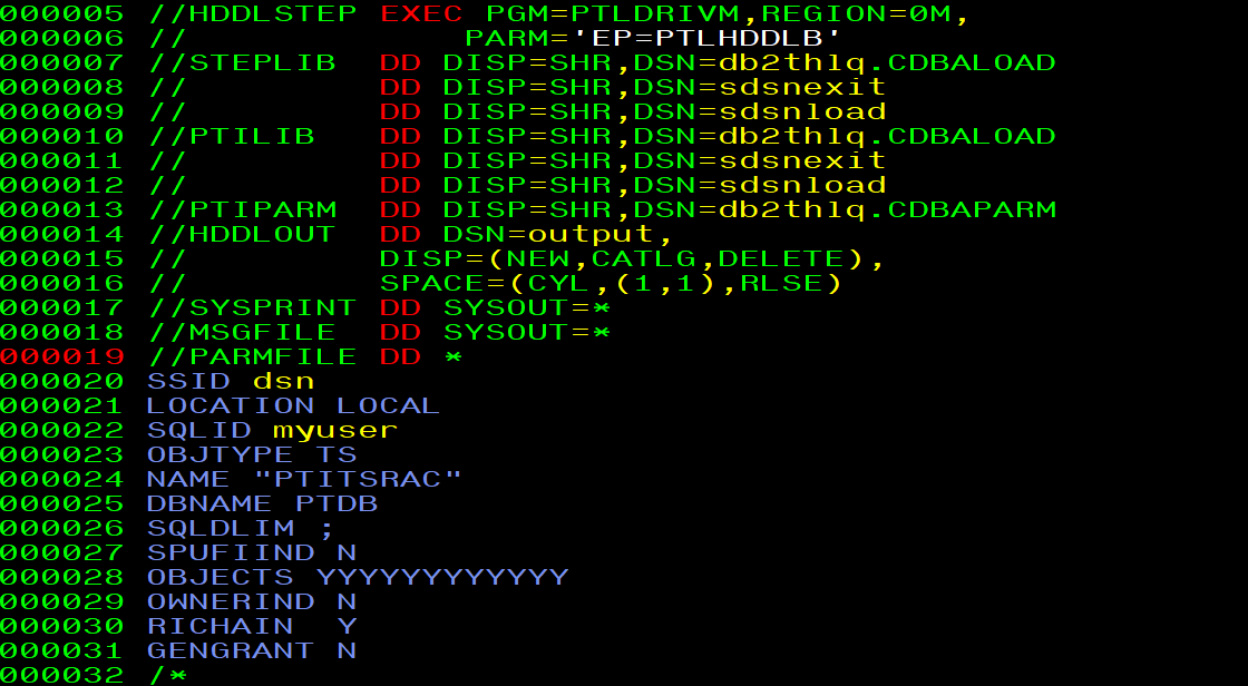
Once you know the JCL and syntax, you can create a shell script that users unfamiliar with the ISPF interface can invoke.
For example, the following Unix script (hddl) is based on the generated JCL and customized to take the database and tablespace name as input:
#!/bin/sh
db2thlq=your-hlq
sdsnload=your-SDSNLOAD
sdsnexit=your-SDSNEXIT
ssid=your-DSN
tmpin=/tmp/inhddl.$$
tmpout=/tmp/outddl.$$
{
  echo "SSID $ssid "                  > $tmpin
  echo "LOCATION LOCAL "             >> $tmpin
  echo "SQLID $(whoami) "            >> $tmpin
  echo "OBJTYPE TS   "               >> $tmpin
  echo "NAME " $2 "           "      >> $tmpin
  echo "DBNAME " $1 "            "   >> $tmpin
  echo "SQLDLIM ;                 "  >> $tmpin
  echo "SPUFIIND N              "    >> $tmpin
  echo "OBJECTS NYYYYNNNN          " >> $tmpin
  echo "OWNERIND N             "     >> $tmpin
  echo "RICHAIN  Y            "      >> $tmpin
  echo "GENGRANT N            "      >> $tmpin
}
mvscmdauth --pgm=PTLDRIVM \
           --args=EP=PTLHDDLB \
           --steplib=$db2thlq.CDBALOAD:$sdsnexit:$sdsnload \
           --ptilib=$db2thlq.CDBALOAD:$sdsnexit:$sdsnload \
           --ptiparm=$db2thlq.CDBAPARM --parmfile=$tmpin \
           --hddlout=$tmpout,LRECL=80,RECFM=FB \
           --msgfile=stdout
cat $tmpout
rm $tmpin $tmpout
Once you edit the script with your libraries and Db2 subsystem on top, you can invoke the script as follows, where the first argument is the database name and the second is the tablespace name:
$ hddl PTDB PTITSRAC
The output is generated to the standard output (a shortened output follows):
.CONNECT dsn
--#SET TERMINATOR ;
SET CURRENT SQLID = 'myuser';
    CREATE DATABASE PTDB
           BUFFERPOOL BP1
           INDEXBP    BP3
           STOGROUP PTSG
           CCSID EBCDIC ;
SET CURRENT SQLID = 'myuser';
    CREATE TABLESPACE PTITSRAC
           IN PTDB
           USING STOGROUP PTSG
               PRIQTY -1
               SECQTY -1
               ERASE NO
           BUFFERPOOL BP1
           DSSIZE 4G
           CLOSE YES
           LOCKMAX SYSTEM
           SEGSIZE 64
           INSERT ALGORITHM 0
           FREEPAGE 0
           PCTFREE 5 FOR UPDATE 0
           GBPCACHE CHANGED
           DEFINE YES
           LOGGED
           TRACKMOD YES
           MAXPARTITIONS 16
           COMPRESS YES
           LOCKSIZE ANY
           MAXROWS 255
           CCSID EBCDIC
           NUMPARTS 1 ;
…
You can make the script more advanced, accept different object types, different options, etc. What you can do now is pass this output to other standard Unix tools and do whatever you need. The new possibilities just opened.
Example 2: Run Batch Processor Script
Batch Processor is a great tool, an integral part of the Broadcom Db2 Tools, that allows execution of individual Db2 tools, scripts generated by Db2 Tools, or scripts created ad hoc by users.
Batch Processor can be invoked from a Unix shell script too, imagine that! Let’s assume we have a batch processor script that executes a Db2 command and a SQL SELECT statement. The script called simply myinput would look like this:
.CONTROL +
 LOGID(dsn) UNIT(SYSDA)
.LIST DDNAME(SYSOUT)
.OPTION NOERRORS
.CONNECT dsn
.CALL DSN PARM(dsn)
.DATA
 -DISPLAY GROUP
.ENDDATA
SELECT * FROM SYSIBM.SYSDUMMY1;The script to invoke Batch Processor can look similar to a prior script and is named bpa:
#!/bin/sh
db2thlq=your-hlq
sdsnload=your-SDSNLOAD
sdsnexit=your-SDSNEXIT
tmpout=/tmp/bpout.$$
mvscmdauth --pgm=PTLDRIVM \
           --args='EP=BPLBCTL' \
           --steplib=$db2thlq.CDBALOAD:$sdsnexit:$sdsnload \
           --ptilib=$db2thlq.CDBALOAD:$sdsnexit:$sdsnload \
           --ptiparm=$db2thlq.CDBAPARM \
           --BPIIPT=$1,LRECL=80,RECFM=FB \
           --PTISELDD=$tmpout,LRECL=4092,RECFM=VB,BLKSIZE=4096 \
           --SYSOUT=stdout
cat $tmpout
rm $tmpout
Finally, the command to execute a batch processor script input is:
# bpa myinputThe output is again generated to the standard output and contains the outputs from the Db2 command and a SELECT as provided in the input script.
1READY
 DSN SYSTEM(dsn)
 DSN
  -DISPLAY GROUP
 DSN7100I  !dsn DSN7GCMD
 *** BEGIN DISPLAY OF GROUP(........) CATALOG LEVEL(V13R1M501)
                   CURRENT FUNCTION LEVEL(V13R1M501)
                   HIGHEST ACTIVATED FUNCTION LEVEL(V13R1M501)
                   HIGHEST POSSIBLE FUNCTION LEVEL(V13R1M503)
                   PROTOCOL LEVEL(2)
                   GROUP ATTACH NAME(....)
 ---------------------------------------------------------------------
 DB2          SUB                     DB2    SYSTEM    IRLM
 MEMBER   ID  SYS  CMDPREF   STATUS   LVL    NAME      SUBSYS IRLMPROC
 -------- --- ---- --------  -------- ------ --------  ----   --------
 ........   0 dsn  !dsn      ACTIVE   131507 lpar      Innn   ssidIRLM
 ---------------------------------------------------------------------
 SPT01 INLINE LENGTH:        32138
 *** END DISPLAY OF GROUP(........)
 DSN9022I  !ssid  DSN7GCMD 'DISPLAY GROUP ' NORMAL COMPLETION
 DSN
 END
 READY
 END
 READY
 END
.FREE FI(SYSTSIN)
.FREE FI(SYSTSPRT)
RETCODE =     0
 SELECT *
 FROM SYSIBM.SYSDUMMY1
---------
 1 ROWS RETRIEVED
---------
 IBMREQD
---------
 Y
Example 3: Run Plan Analyzer Explain Report
The prior example opens new possibilities. Many of the Db2 Tools execute through the Batch Processor so we can use the prior script to do even more! For instance, you can run a Plan Analyzer dependency report or access report (wordy EXPLAIN SQL output).
Let’s assume we want to Explain the following SQL statement “SELECT COLLID, NAME, CREATOR FROM SYSIBM.SYSPACKAGE WHERE NAME = ‘PPA@EXE1’”. The script to explain it may look like this (named myinput2):
.CONTROL BPID(BP-01)   +
 LOGID(dsn) UNIT(SYSDA)
.LIST DDNAME(SYSOUT)
.OPTION NOERRORS
.RESTART OVERRIDE
.CONNECT dsn
.CALL EXPLAIN
.DATA
   RULESSID   = (dsn)
   ACM        = (N,myuser)
   STRATEGY   = (dsn,,myuser)
   PLANTAB    = (COMMIT)
   PRIAUTH    = (myuser)
   SECAUTH    = (myuser)
   SQLQUAL    = (SYSIBM)
   CASE       = (UPPER)
   LINES      = (60)
   PROCDDF    = (Y)
   FLOATFMT   = (SCI)
   PROCVIEW   = (Y)
   EXPLTYPE   = (FUTURE)
   ISOLATE    = (CS)
   TARGET     = (dsn(@DEFAULT))
   REPORT     = (DEPENDENCY,SUMMARY,ACCESS,TREE)
   SRCSQL     = (
SELECT COLLID, NAME, CREATOR FROM SYSIBM.SYSPACKAGE
   WHERE NAME = 'PPA@EXE1';)
.ENDDATA
We can run this script as:
$ bpa myinput2
You will see a lot of output, let’s highlight only the ACCESS (Explain) and TREE part of the report:
PPA vv.r.mm   --------- PLAN ANALYZER ENHANCED EXPLAIN ------------- PAGE     3
DATE yy/mm/dd            SQL STATEMENT DETAIL REPORTS                TIME hh:mm
 SOURCE DB2 SSID:ssid                        DATE/TIME:yy/mm/dd, 10:17:39:70
 TARGET DB2 SSID:ssid                        SQL CODE :+0
      EXPL TYPE :FUTURE                      MESSAGE  :
            STMT:1            (0)
            PLAN:
            DBRM:
     HINT USED :N/A
SQL STATEMENT TEXT
SELECT  COLLID , NAME , CREATOR
   FROM SYSIBM.SYSPACKAGE
  WHERE NAME = 'PPA@EXE1'
ACCESS PATH ANALYSIS:
THE ESTIMATED SQL COST COMPUTED AT EXPLAIN TIME IS ROUGHLY
4 MILLISECONDS OR 247 SERVICE UNITS AND THE OVERALL
ESTIMATED TOTAL COST (CPU + I/O UTILIZATION) IS +.96235 E+02.
THIS ACCESS PATH CONSISTS OF 1 QUERY BLOCK(S).
                 QUERY BLOCK 1 HAS 1 STEP(S).
+--- QUERY BLOCK: 1
I
I    THIS QUERY BLOCK CONSISTS OF 1 STEP(S).
I
I    THIS QUERY BLOCK SQL OPERATION IS: SELECT
I
I    +--- PLAN STEP: 1
I    I
I    I    THE UNICODE TABLE SYSIBM.SYSPACKAGE
I    I    IS THE ONLY TABLE ACCESSED TO SATISFY THIS QUERY.  THE
I    I    DATA FROM THIS TABLE WILL BE ACCESSED VIA
I    I    A NON-MATCHING INDEX AND DATA SCAN USING THE INDEX
I    I    SYSIBM.DSNKKX02.
I    I    THIS ACCESS WILL NOT USE THE INDEX TREE STRUCTURE.
I    I    INDEX LEAF PAGES WILL BE SCANNED TO FIND QUALIFYING
I    I    INDEX KEY VALUES.  SUBSEQUENT ACCESS TO DATA PAGES
I    I    WILL THEN BE MADE TO RETRIEVE THE REMAINING DATA.
I    I
I    I    FOR INDEX ACCESS, THE DIRECTION OF THE INDEX SCAN IS FORWARD.
I    I
I    I    THIS TABLE'S TABLESPACE WILL BE LOCKED IN INTENT SHARE MODE.
I    I    THIS PROCESS CAN READ DATA IN THE TABLE OR TABLESPACE, BUT
I    I    NOT CHANGE IT.  OTHER APPLICATION PROCESSES CAN BOTH READ
I    I    AND CHANGE THE DATA.
I    I
I    I    DATA PAGES MAY BE READ IN ADVANCE BY DYNAMIC PREFETCH.
I    I
I    I    THE ACCESS PATH WAS DETERMINED AT BIND TIME,
I    I    USING A DEFAULT FILTER FACTOR FOR ANY HOST VARIABLES,
I    I    PARAMETER MARKERS, OR SPECIAL REGISTERS.
I    I
I    +--- PLAN STEP: 1 END.
I
PPA vv.r.mm   --------- PLAN ANALYZER ENHANCED EXPLAIN -------------
PAGE     4
DATE yy/mm/dd            SQL STATEMENT DETAIL REPORTS
TIME hh:mm
I
+--- QUERY BLOCK: 1 END.
PPA vv.r.mm   --------- PLAN ANALYZER ENHANCED EXPLAIN ------------- PAGE     6
DATE yy/mm/dd                    TREE REPORT                         TIME hh:mm
TREE DIAGRAM OF PHYSICAL OBJECTS.
DATABASE (DSNDB06)
I
+--- TABLESPACE UTS PBG (DSNDB06.SYSTSPKG)    32 SEGMENTS     1 PARTITIONS
     I
     +--- TABLE (SYSIBM.SYSPACKAGE)
          I
          +--- PRIMARY KEYCOL (LOCATION)
          +--- PRIMARY KEYCOL (COLLID)
          +--- PRIMARY KEYCOL (NAME)
          +--- PRIMARY KEYCOL (CONTOKEN)
          I
          +--- CHILD TABLE (SYSIBM.SYSPACKCOPY) SYSTEM/DSNKK@PC/CASCADE
          I    I
          I    +--- FOREIGN KEYCOL (LOCATION)
          I    +--- FOREIGN KEYCOL (COLLID)
          I    +--- FOREIGN KEYCOL (NAME)
          I    +--- FOREIGN KEYCOL (CONTOKEN)
          I
          +--- CHILD TABLE (SYSIBM.SYSPACKDEP) SYSTEM/DSNKK@KD/CASCADE
          I    I
          I    +--- FOREIGN KEYCOL (DLOCATION)
          I    +--- FOREIGN KEYCOL (DCOLLID)
          I    +--- FOREIGN KEYCOL (DNAME)
          I    +--- FOREIGN KEYCOL (DCONTOKEN)
          I
          +--- CHILD TABLE (SYSIBM.SYSPACKSTMT) SYSTEM/DSNKK@KS/CASCADE
          I    I
          I    +--- FOREIGN KEYCOL (LOCATION)
          I    +--- FOREIGN KEYCOL (COLLID)
          I    +--- FOREIGN KEYCOL (NAME)
          I    +--- FOREIGN KEYCOL (CONTOKEN)
          I
          +--- CHILD TABLE (SYSIBM.SYSPKSYSTEM) SYSTEM/DSNKK@KY/CASCADE
          I    I
          I    +--- FOREIGN KEYCOL (LOCATION)
          I    +--- FOREIGN KEYCOL (COLLID)
          I    +--- FOREIGN KEYCOL (NAME)
          I    +--- FOREIGN KEYCOL (CONTOKEN)
          I
          +--- INDEX NPSI (SYSIBM.DSNKKX01)
          I    I    UNIQUE,CLUSTERING
          I    I
          I    +--- IXCOL (LOCATION)
          I    +--- IXCOL (COLLID)
          I    +--- IXCOL (NAME)
          I    +--- IXCOL (VERSION)
          I
          +--- INDEX NPSI (SYSIBM.DSNKKX02)
               I    PRIMARY
               I
               +--- IXCOL (LOCATION)
               +--- IXCOL (COLLID)
               +--- IXCOL (NAME)
               +--- IXCOL (CONTOKEN)
PPA vv.r.mm   --------- PLAN ANALYZER ENHANCED EXPLAIN -------------
PAGE     7
The output is lengthy, but can provide useful information even to folks not familiar with the Db2 Explain facility. The output can be fed to an AI tool and you may get a simplified text, such as:
- What it is: The Plan Analyzer Enhanced Explain report for a SQL statement that explains how the statement executes in detail.
- The SQL query: The query is trying to grab COLLID, NAME, and CREATOR from a table called SYSIBM.SYSPACKAGE, specifically where the NAME is ‘PPA@EXE1’.
- How much it costs (estimated): The database thinks this query will take about 4 milliseconds, or 247 “service units.” The total cost (CPU + I/O) is estimated at roughly 96.235.
- Access path breakdown:
- It’s a single query block, with one step.
- It’s doing a SELECT operation.
- It’s hitting the SYSIBM.SYSPACKAGE table (which is Unicode, apparently).
- Notably, it’s not using the index perfectly. It’s doing a “non-matching index and data scan” using SYSIBM.DSNKKX02. This means it’s scanning the index leaf pages, then going to the actual data pages to get the info.
- The index scan goes forward.
- The table’s tablespace will be “intent share mode” locked, meaning other things can still read and change the data.
- It might use “dynamic prefetch” to read data pages ahead of time.
- The access path was decided when it was “bound” (compiled, essentially), using default values for any variables.
- Database structure (Tree Report):
- The main database is DSNDB06.
- Inside that, there’s a tablespace DSNDB06.SYSTSPKG (32 segments, 1 partition).
- That tablespace holds the SYSIBM.SYSPACKAGE table.
- This table has a primary key made up of LOCATION, COLLID, NAME, and CONTOKEN.
- It also has a bunch of “child tables” linked to it (like SYSPACKCOPY, SYSPACKDEP, etc.).
- There are two indexes:
- SYSIBM.DSNKKX01: This one is unique and clustering, with columns LOCATION, COLLID, NAME, and VERSION.
- SYSIBM.DSNKKX02: This one is primary, with columns LOCATION, COLLID, NAME, and CONTOKEN. (This is the one it’s using for the scan, remember?)
How do you like it? This is what can be easily available thanks to executing Plan Analyzer through the Unix interface.
The script itself can be further simplified as well, for instance we can make it so that the script only accepts the SQL and generates all the inputs under the hood. You would invoke it as a new script:
$ ppa “SELECT COLLID, NAME, CREATOR FROM SYSIBM.SYSPACKAGE WHERE NAME = 'PPA@EXE1';”
Summary
Hopefully, these examples give you an idea of what is possible to simplify and automate use of the Broadcom Db2 Tools. You can customize your scripts to accept inputs, tailor your reports, etc. Moreover, you can execute your scripts remotely through SSH. The possibilities are almost endless.
Are you interested in executing the Broadcom Db2 tools from the Unix shell? Would you like Broadcom to provide sample Unix scripts? Please let us know.
Learn more about the Broadcom Database Management Suite for Db2



0 Comments